Meta Ads Library
How to Use the Meta Ads Library to Study Competitor Ads (India Guide 2026)
A step-by-step guide to the Meta Ads Library for Indian D2C brands: what you can see in India, how to find a rival’s winning ads, and a real 134-ad teardown.
By Ish Batra · · 11 min read
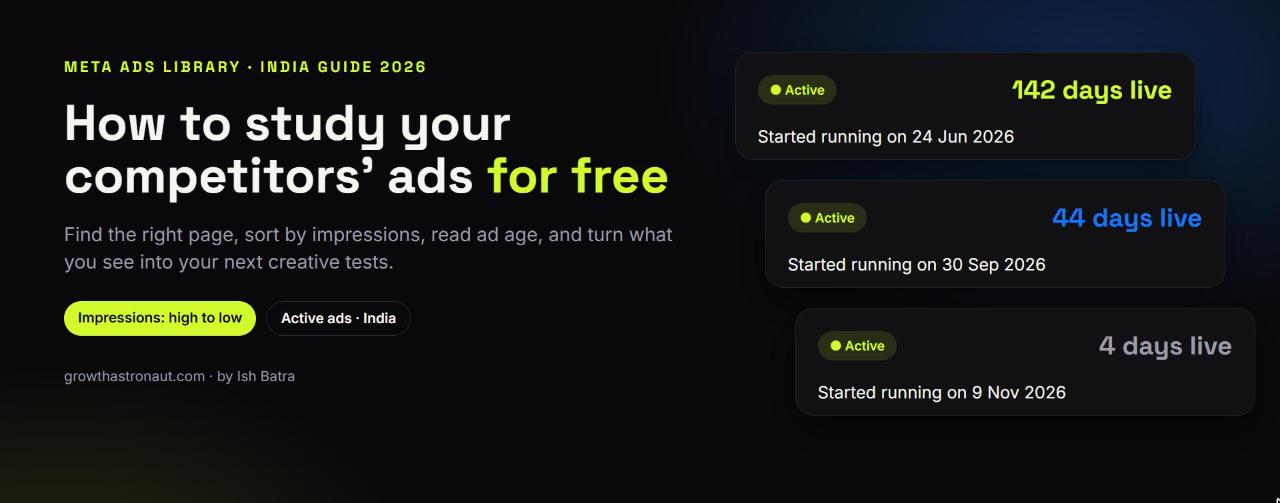
The Meta Ads Library is a free, public database of every ad currently running on Facebook, Instagram, Messenger, WhatsApp, Threads and the Audience Network. You don’t need to log in. For any competitor running ads in India, you can see each live ad’s creative, copy, start date, platforms and how many versions it has.
You can’t see their spend, reach or targeting in India. That data is only shown for ads that run in the EU, or for political and social-issue ads. The skill is reading what is visible: which ads Meta is delivering most, and which ones the brand has kept alive for months. This guide shows exactly how, with screenshots and a real teardown of one Indian D2C brand’s 134 live ads.
What is the Meta Ads Library?
Meta calls it the Ad Library (most people search for it as “Meta Ads Library” or the older “Facebook Ads Library”). It lives at facebook.com/ads/library. According to Meta, it lets anyone search all ads currently running across Meta technologies. It also keeps ads about social issues, elections or politics for seven years, ads that ran anywhere in the EU for a year, and ads that ran in the UK after 1 July 2025 for a year.
An ad appears in the library within 24 hours of its first impression, and any edits show up within 24 hours too. So what you see is close to real time.
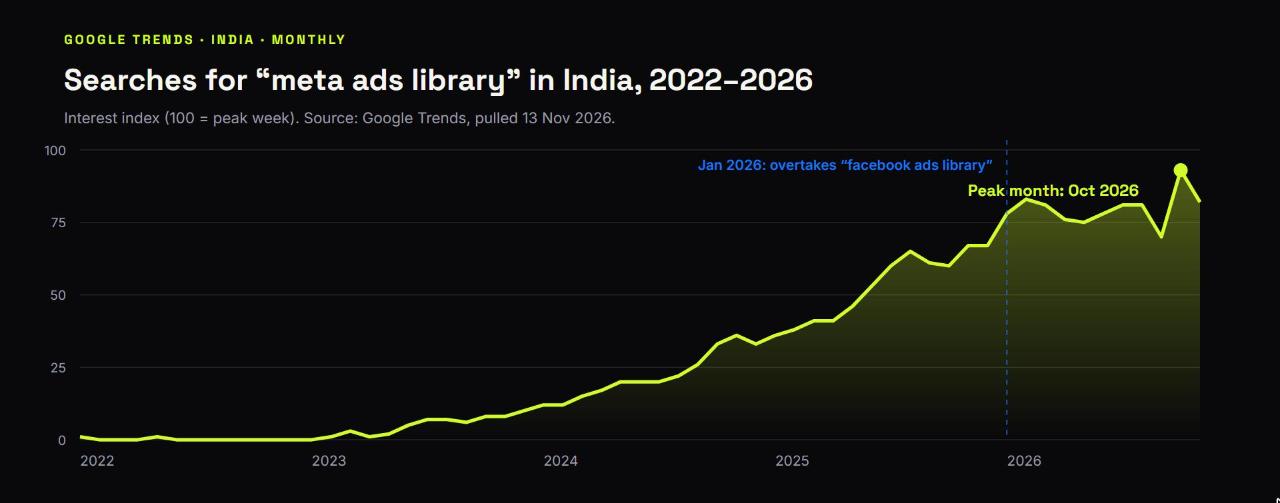
Indian marketers have caught on. Google Keyword Planner puts searches for “meta ads library” in India at 100K–1M a month, and Google Trends shows interest at an all-time high. In January 2026, “meta ads library” overtook “facebook ads library” as the bigger search term in India.
What you can (and can’t) see in India
This is the part most guides skip, and it matters for Indian brands. The library shows far more for ads delivered in the EU than for ads delivered in India.
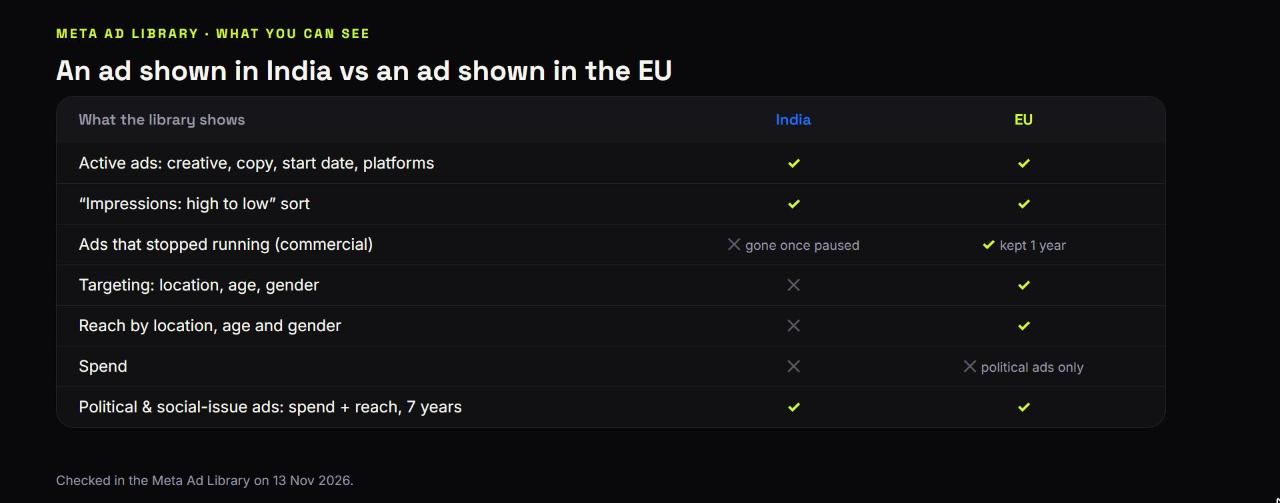
- You can see, in India: every active ad’s creative and copy, its Library ID, the date it started running, the platforms it runs on, whether it has multiple versions, and how many ads reuse the same creative.
- You can’t see, in India: spend, reach, impressions or targeting for normal commercial ads, or ads that have stopped running. Once a competitor pauses an ad, it disappears.
- For ads delivered in the EU, Meta adds the targeting (location, age, gender) and reach broken down by location, age and gender, and keeps the ad for a year after it stops.
- For political and social-issue ads in any country, including India, the library shows spend and reach and keeps the ads for seven years.
Because spend is hidden in India, the two best performance signals you have are the sort order (Impressions: high to low) and the ad’s age. The rest of this guide is built around those two.
How to use the Meta Ads Library: step by step
Step 1: Open facebook.com/ads/library. Set the location to India and the ad category to “All ads”.
Step 2: Search for the advertiser, not a keyword. This is the most common mistake. When I typed “the whole truth” as a keyword, the library returned more than 50,000 results, mostly unrelated ads that happened to contain those words. Instead, type the brand name and pick it from the “Advertisers” list in the dropdown.
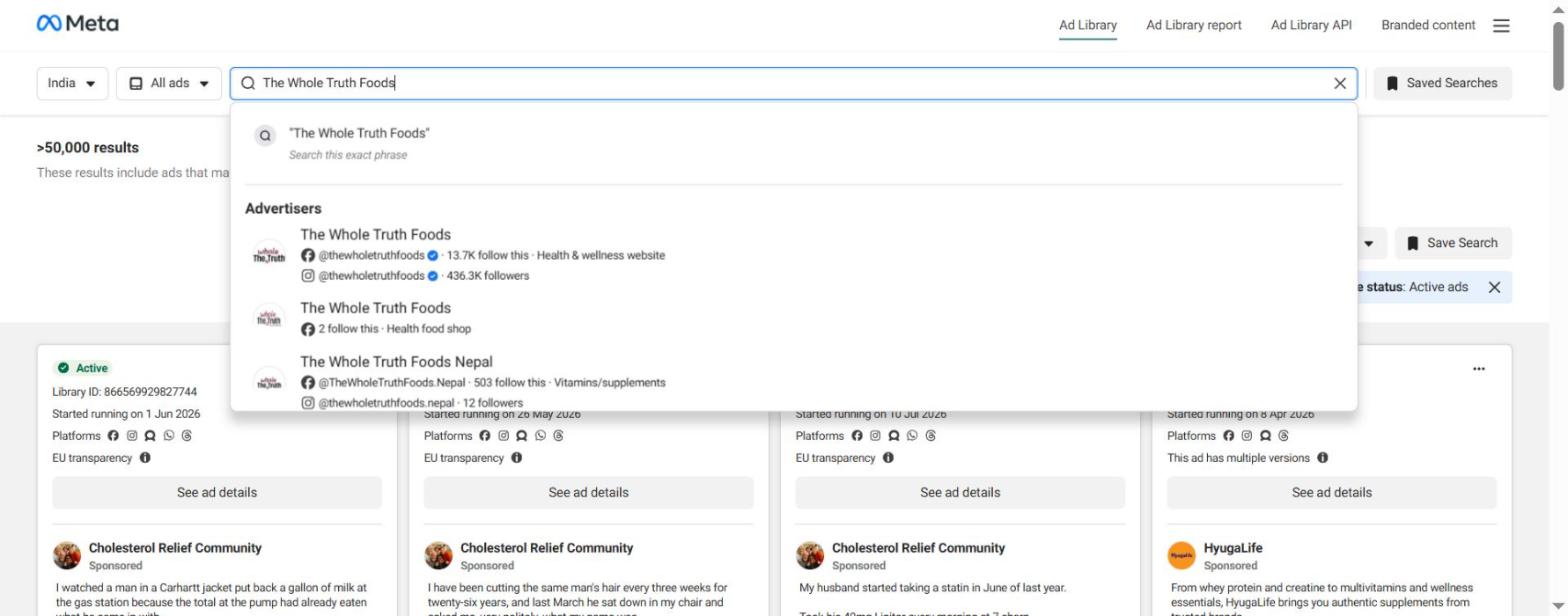
Watch for lookalike pages. In the dropdown above, the verified page (blue tick, 436K Instagram followers) sits next to a page with the same name and two followers, plus a Nepal page. Always choose the verified one.
Step 3: Read the advertiser’s ad page. You’ll see the total number of live ads (about 190 for this brand in India) and a card for each one, showing its status, Library ID, start date, platforms and whether it has multiple versions.
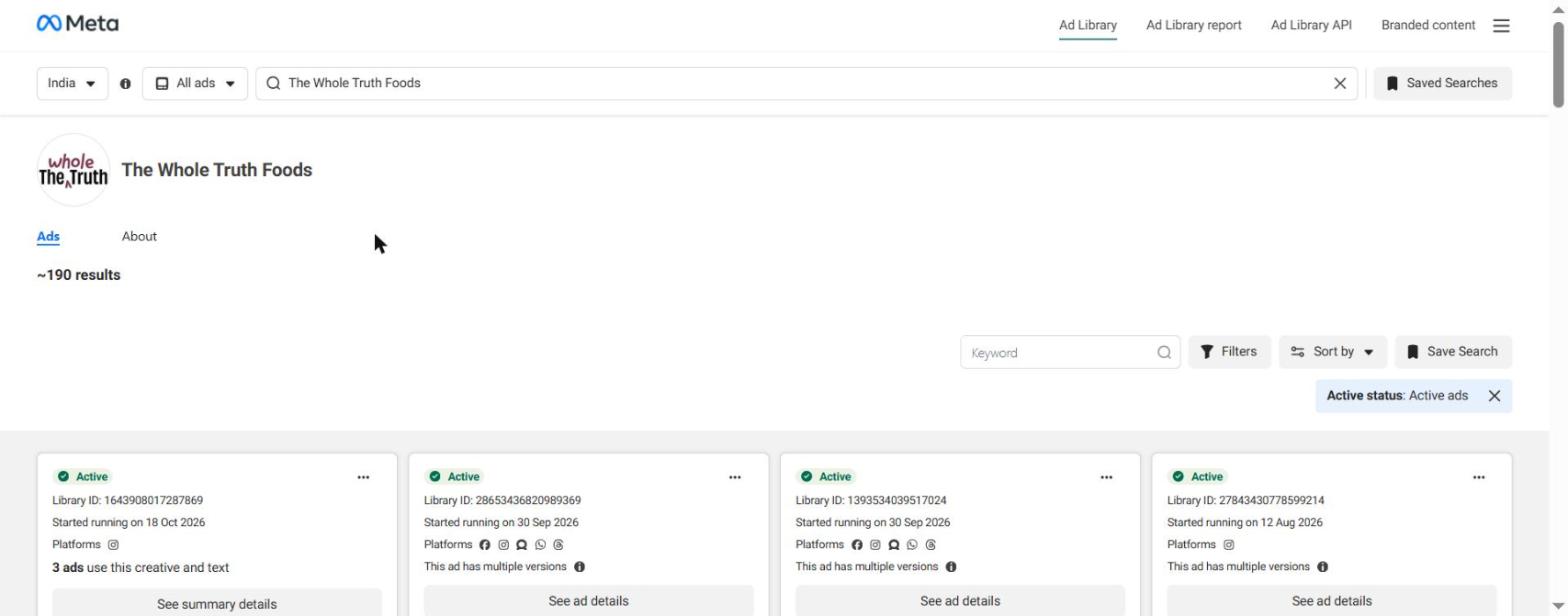
Step 4: Use the filters to narrow it down. The Filters panel lets you choose language, platform, media type, active status and an “Impressions by date” range. Platform options are now Facebook, Instagram, Audience Network, Messenger, WhatsApp and Threads. To see only Instagram ads, pick Instagram here.
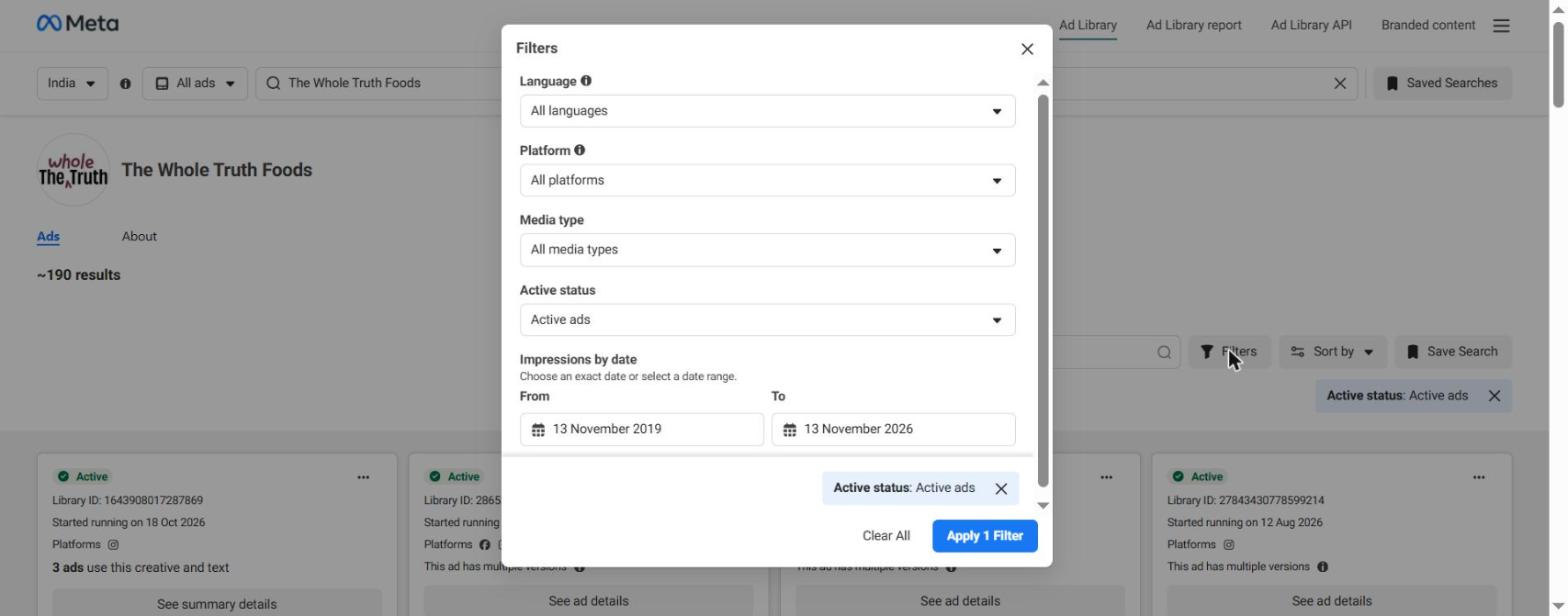
Step 5: Check the sort order. By default, an advertiser’s ads are sorted “Impressions: high to low”, so the ads Meta has delivered most sit at the top. Switch to “Most recent” when you want to spot a new launch or a fresh test.
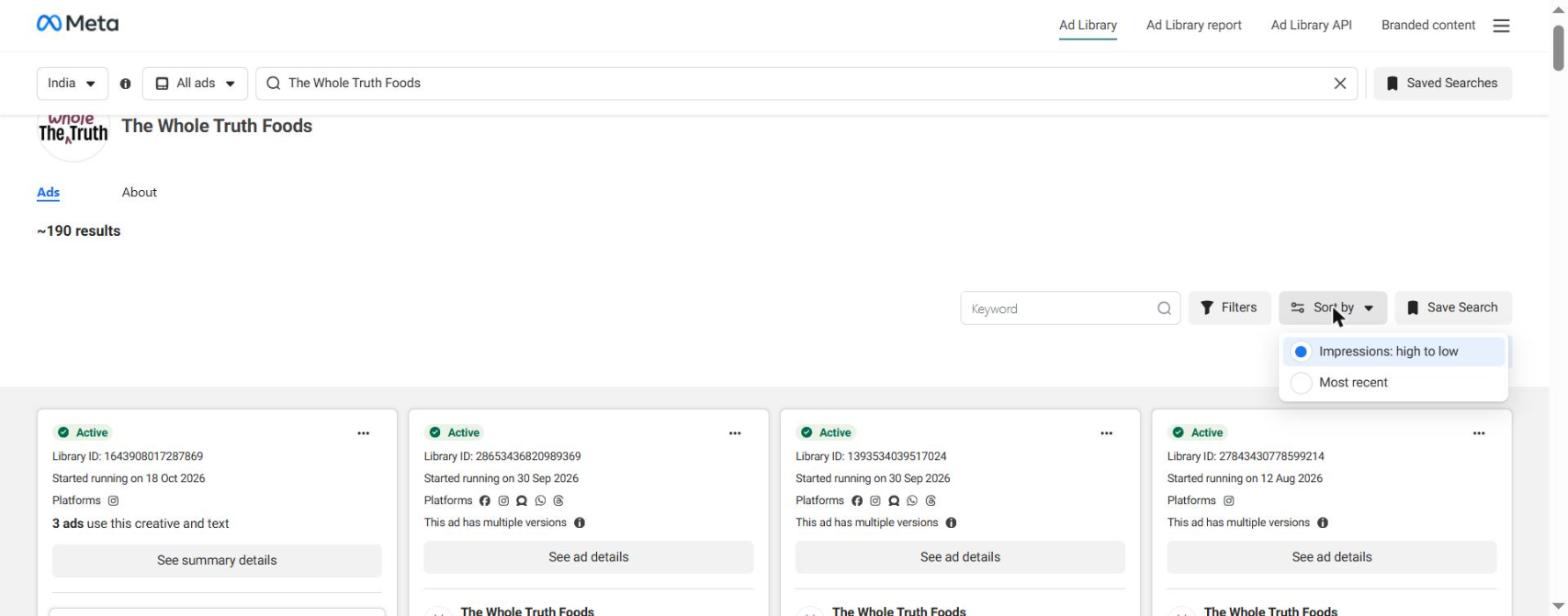
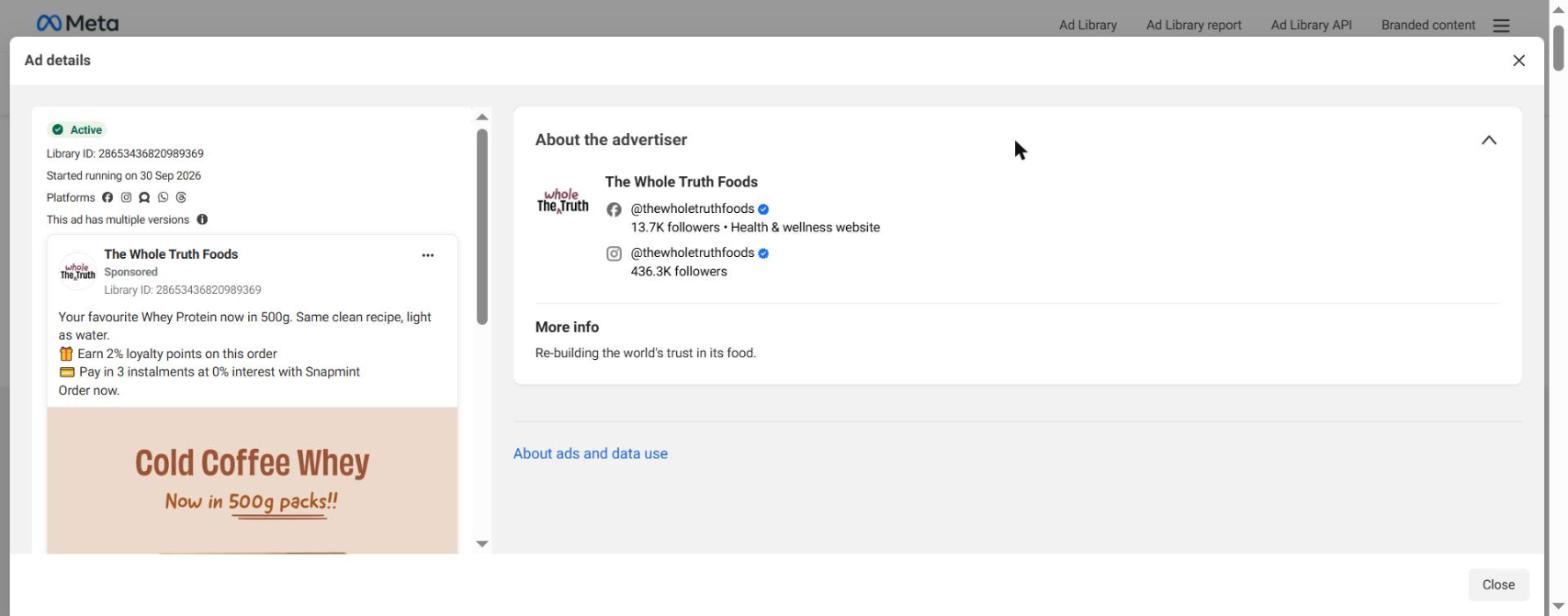
Step 6: Open the ad details. Click “See ad details” to view every version of an ad. “This ad has multiple versions” means the brand is testing variations of the same idea. “3 ads use this creative and text” means the same creative runs across several ad sets or campaigns, often a sign it is working. For an ad delivered in India, the details panel only adds “About the advertiser”.
A real teardown: what 134 live ads from one D2C brand tell you
To show what this looks like in practice, I loaded every live ad from The Whole Truth Foods in India on 13 November 2026 and counted them. The library showed 134 live creatives, which add up to 182 ads once you count creatives reused across several ads.
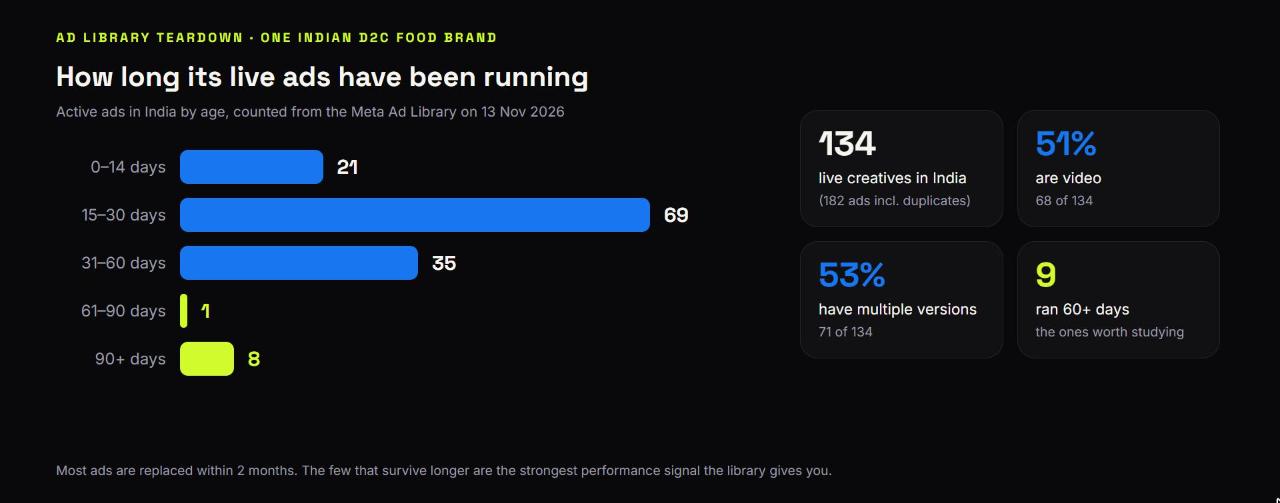
- Most ads are new: 90 of 134 creatives (67%) started in the last 30 days, and 125 (93%) in the last 60 days.
- Only 9 creatives had been live for more than 60 days. These survivors are the ads to study first.
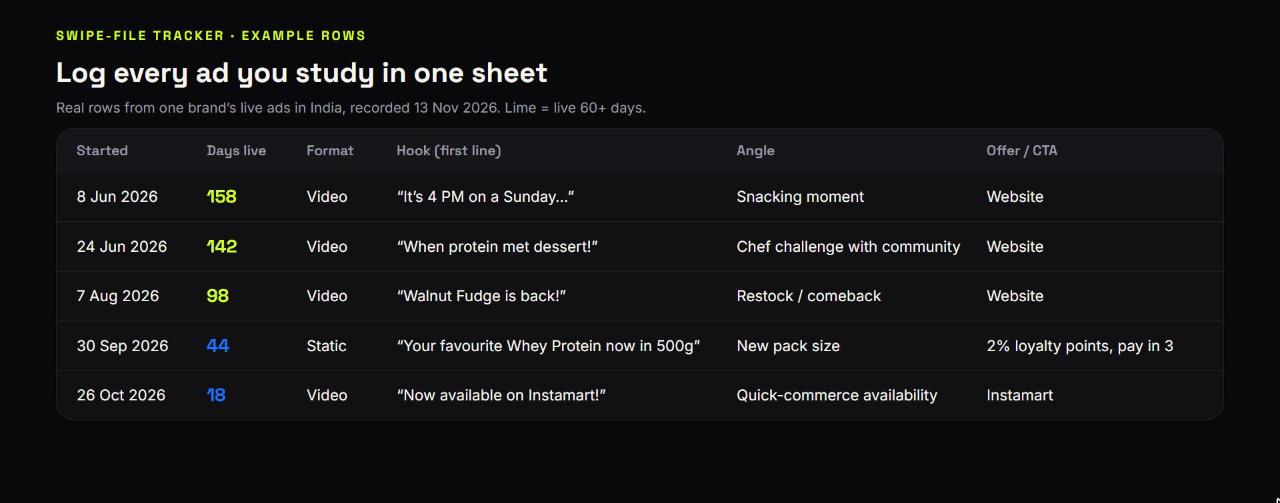
- The survivors repeat: “Walnut Fudge is back!” was launched three times (7, 12 and 13 August), and “Introducing Hazelnut Millet Cocoa” started in June and was relaunched in August and again in October. Relaunching the same creative is a strong hint that it worked.
- Half the ads are video (68 of 134), and 71 of 134 have multiple versions, so the brand is testing heavily.
- Launches come in waves: a batch of whey and plant-protein ads all started on 30 September, a new pack-size push with offers like “Earn 2% loyalty points” and “Pay in 3 instalments at 0% interest”.
- Channel shifts show up too: an ad that started on 26 October says “Now available on Instamart!”, a public signal of a quick-commerce push. Five ads are creator collaborations run from creators’ handles.
None of this needs spend data. From one page you learn which creatives are proven, which angles are being tested, which offers are live and which channel the brand is pushing.
A 6-step competitor research workflow
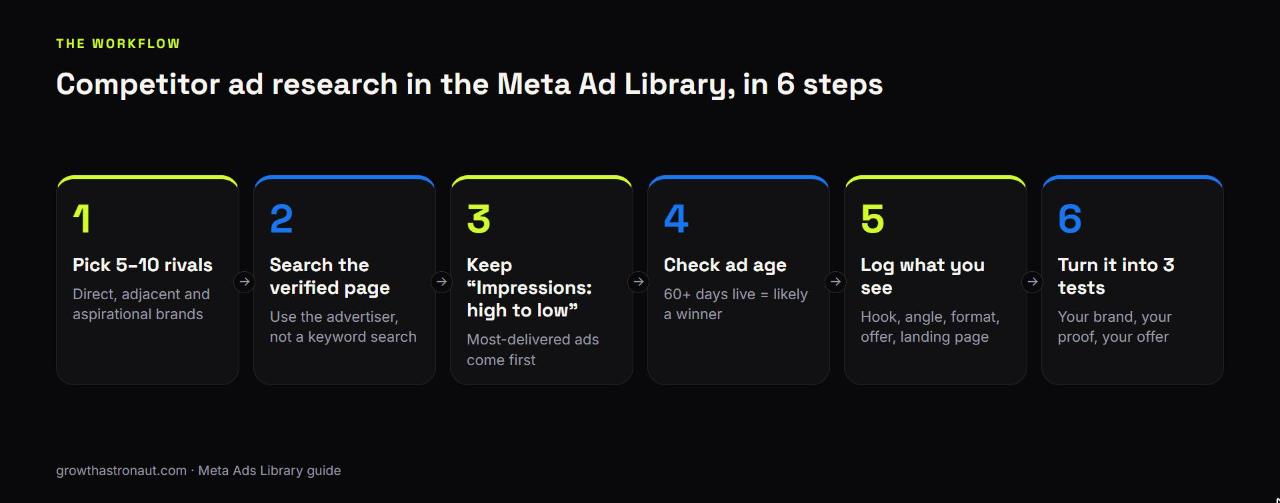
- Pick 5–10 brands to watch: direct competitors, adjacent categories selling to the same customer, and one or two aspirational brands.
- Search each brand’s verified page, never a keyword.
- Keep the sort on “Impressions: high to low” and look at the first 10–20 ads.
- Note each ad’s age. Anything live for 60+ days, or relaunched several times, is likely a winner.
- Log what you see in a sheet: start date, days live, format, hook, angle, offer and landing page.
- Turn the patterns into three tests for your own account, using your product, your proof and your offer.
Track how many of the angles you borrowed beat your current best ad on cost per purchase within 14 days. That tells you whether your competitor research is actually paying off.
Search tips most people miss
- Use exact-phrase search for categories: the dropdown offers “Search this exact phrase”. Try phrases like “whey protein” or “kids snacks” to see every brand advertising a category, not just the ones you know.
- Find Instagram-only ads with the Platform filter set to Instagram.
- Save searches: the “Save Search” button stores a query, so your weekly check takes minutes.
- Use the Impressions by date filter to look at a specific period, such as a festive sale.
- Check branded content separately: Meta’s Branded content library lists live paid-partnership posts, which is useful for spotting a competitor’s creator deals.
- For Google, use the Google Ads Transparency Center, which shows Search, Display and YouTube ads by advertiser.
Limits and mistakes to avoid
- Don’t treat ad age as proof. A long-running ad is usually a winner, but it can also be an ad nobody switched off. Combine age with the impressions sort and relaunches.
- Don’t assume the count is exact. The library shows approximate totals (“~190 results”), and one creative can sit behind several ads.
- Don’t copy creatives. Copy the reason they work: the hook, the proof, the offer structure. Copied creative rarely beats the original, and it can create IP problems.
- Skip tiny tests. Since December 2025, ads with fewer than 100 impressions carry a “Low impression count” label, so you can ignore ads that barely ran.
- Don’t forget that inactive ads vanish in India. If you want history, screenshot or log ads when you see them.
Meta Ads Library FAQs
Is the Meta Ads Library free? Yes. It’s free and public, and you can browse it without a Facebook account or login.
Can I see a competitor’s ad spend in India? No. Spend is only shown for political and social-issue ads. For ads delivered in the EU, Meta shows reach and targeting, but still not spend for commercial ads.
Can I see a competitor’s old ads? Not in India. Commercial ads disappear once they stop running. Ads delivered in the EU stay for a year after they stop.
How do I see only Instagram ads? Open Filters, set Platform to Instagram and apply the filter.
How do I know which competitor ads are working? Look at the ads at the top of the default “Impressions: high to low” sort, ads that have been running for 60+ days, and creatives relaunched more than once.
How fast do new ads appear? Meta says an ad appears in the library within 24 hours of its first impression.
The bottom line
The Meta Ads Library won’t tell you what your competitors spend in India, but it tells you almost everything else: what they’re running, what Meta delivers most, what they’ve kept alive for months and what they’re launching next. Spend 30 minutes a week on it with the workflow above and your creative tests will start from proof instead of guesses.
Want a done-for-you competitor ad teardown for your category? I run Meta ads for D2C brands and can map what your top competitors are testing. Get in touch through the contact page.